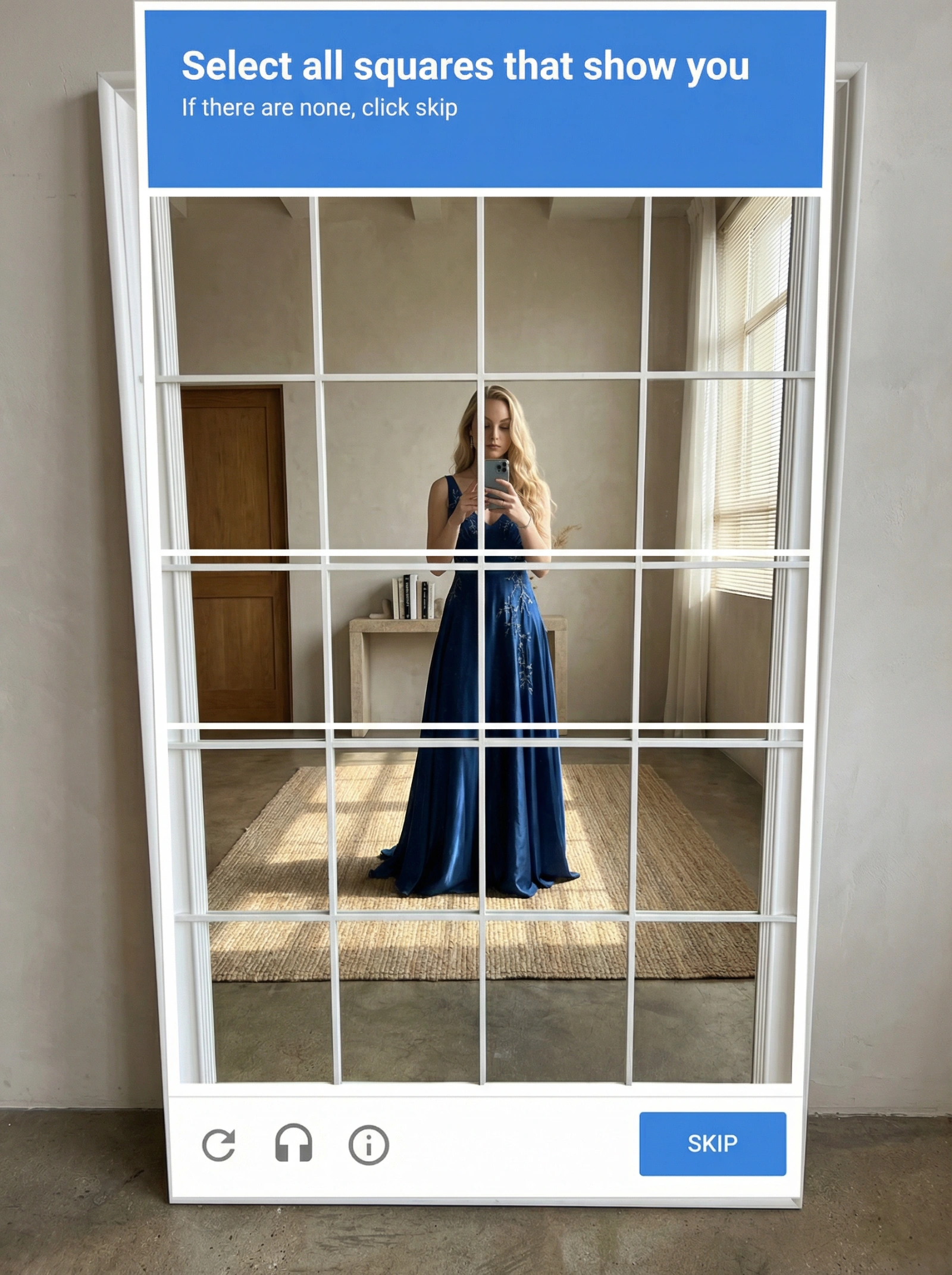
Hyper-Real Mirror Selfie with CAPTCHA
Ratio 3:4Image-to-Image
Creator Reference:@Arminn_Ai
Original Post

Hyper-Real Mirror Selfie with CAPTCHA

Copy this Nano Banana Pro reference-guided prompt to create portrait concepts in studio setups with 35mm film texture and photorealistic detail. Best in...

Master PromptClick to select all

{ "intent": "a hyper-realistic photograph of a custom physical floor mirror with a 'robot test' CAPTCHA interface, capturing a mirror selfie. The physical mirror is placed against a plain wall, while its reflection shows a furnished studio.", "frame": { "aspect_ratio": "4:5", "composition": "A full frontal photograph centered precisely on the large, leaning floor mirror. The mirror's white frame and the physical 4x4 grid structure are the dominant compositional elements.", "style_mode": "documentary_realism" }, "subject": { "identity": "user input image.", "wardrobe": "user input image.", "pose": "Standing directly in front of the mirror, holding a smartphone up at chest level to take a mirror selfie." }, "environment": { "location_physical": "The large floor mirror is positioned leaning against a plain, neutrally painted plaster wall.", "background_reflection": "In contrast to the physical placement, the reflection within the mirror reveals a rich, lived-in studio space behind the subject. Visible elements in the reflection include a warm wooden door frame, a window with venetian blinds casting linear shadows, and a wooden console table with small objects like books.", "flooring": "Polished concrete flooring. In the reflection, this is softened by a large, textured modern area rug with a subtle geometric pattern positioned under the subject.", "props": "The large physical floor mirror has a thick white outer frame. The top blue header bar contains white text: 'Select all squares that show you'. Below that, smaller white text: 'If there are none, click skip'. The mirror surface is strictly divided into a 4x4 grid consisting of sixteen perfectly equal square panels by thin, narrow physical raised white bars that overlay the continuous glass sheet. The bottom white bar has a blue rectangular button on the right that says 'SKIP', and small icons (refresh, audio, info) on the left.", "glass_materiality": "High-fidelity real glass exhibiting subtle physical imperfections such as faint dust particles or very slight smudges. Crucially, the narrow raised white grid bars cast distinct, realistic shadows onto the mirror glass behind them, emphasizing the physical separation between the grid and the deep reflection." }, "lighting": { "type": "Natural daylight.", "direction": "Coming from the window visible in the reflection, creating volume and dimension in the reflected room and casting real shadows from the mirror frame onto the physical wall behind it.", "color_temperature": "5500K (daylight).", "contrast": "Moderate contrast.", "interaction": "The light creates realistic reflections on the glossy white frame and slight specular highlights on the glass surface." }, "camera": { "sensor_format": "Full-frame digital sensor.", "lens": "35mm wide-angle lens.", "aperture_depth_of_field": "f/8, ensuring sharp focus across the entire mirror frame, the narrow physical white grid bars, the subject, and the background furniture in the reflection.", "shutter_speed": "1/125s.", "iso": "200.", "camera_position": "Eye-level with the subject, directly in front of the mirror, capturing the full frontal view." }, "color_grade": { "palette": "Neutral background tones anchored by the white frame, plain wall, and concrete floor, punctuated by the vivid blue of the header bar, the warmth of the reflected wood furniture, and the colors of the subject's clothing.", "saturation": "Natural.", "tone_mapping": "Standard." }, "negative": { "style": "No digital illustration, no painting, no abstract.", "content": "No distortion, no text other than what is on the mirror frame, no beveled/cut glass grid, no flat printed grid lines (must be narrow physical raised bars), no clutter behind the physical mirror frame." } }

Optimal Generation Parameters
Aspect Ratio
3:4
ModelNano Banana Pro
Aesthetic Keynotes35mm Film, Photorealistic, Cinematic, Studio

Test & Generate with GPT Image 2

Prompt tokens and APIMart GPT Image 2 are pre-loaded. Customize or click generate.

GPT Image 2 ジェネレーター

Hyper-Real Mirror Selfie with CAPTCHA
Nano Banana 2
Creative Blueprint & Recipe Breakdown

How to Master & Adapt This Visual

Professional prompts rely on modular tokens. Use this recipe breakdown to swap subjects, control studio lighting, and eliminate common AI artifacts.

Prompt Variables Blueprint (What to Customize First)

Iterate on one variable group at a time to maintain stylistic consistency:

1Change the subject block first: { "intent": "a hyper-realistic photograph of a custom physical floor mirror with a 'robot test' CAPTCHA interface,...
2Adjust the mood through light and backdrop cues: The physical mirror is placed against a plain wall, while its reflection shows a furnished studio.
3Keep the finish constraints aligned while you test variants: The mirror surface is strictly divided into a 4x4 grid consisting of sixteen perfectly equal square panels by thin,...

3 Style Recipes

Swap the subject, keep the frameRecipe #1

Replace { "intent": "a hyper-realistic photograph of a custom physical floor mirror with a... with your own subject while leaving the camera and composition cues intact.

Retune the mood, not the structureRecipe #2

Keep the subject block, then rewrite the physical mirror is placed against a plain wall, while its reflection shows a... to move the image into a new lighting setup.

Push the restyle with a cleaner referenceRecipe #3

Start from a sharper or more contrasty source image, then edit finish descriptors only after subject preservation is stable.

Production Quality Guide: Best Use vs. Pitfalls

Ideal Use Cases (Where it Shines)
  • •Portrait studies, beauty concepts, and tightly framed editorial references.
  • •Reference-image workflows where identity, product shape, or silhouette should survive the restyle.
  • •Cinematic, mood-first outputs where light direction carries a lot of the final image quality.
  • ✓Start with a sharp reference image. This prompt is written to preserve source identity, silhouette, or product structure before stylization.
  • ✓Use 3:4 on the first run, then test alternate crops after the base composition is working.
  • ✓This prompt suppresses text or logos. Remove that constraint before asking for branded packaging, typography, or visible watermarks.
Pitfalls to Avoid (Common Mistakes)
  • !Ignoring the recommended 3:4 crop on the first run. The prompt's composition cues were written for that frame.
  • !Using a muddy reference image and expecting the prompt to repair identity, silhouette, or packaging structure on its own.
  • !Asking for readable type, logos, or packaging text without first removing the no-text constraint.
  • ✕Skip if: You need a wide environment shot or multiple subjects competing for attention in the same frame.
  • ✕Skip if: You need to begin with a radically different crop than 3:4 instead of honoring the existing composition hints.
  • ✕Skip if: Your reference image is low-resolution, badly lit, or cluttered enough to break subject preservation.

Technical Analysis & How This Prompt Works

Copy this Nano Banana Pro reference-guided prompt to create portrait concepts in studio setups with 35mm film texture and photorealistic detail. Best in......

Use a clean reference image with obvious subject edges and readable facial or product details before you start changing the styling. Keep the generator on 3:4 for the closest match. The mood is anchored by the physical mirror is placed against a plain wall, while its reflection shows a furnished studio.

Explore Related Curated Categories

More Visual Inspirations

Explore prompts sharing similar aesthetic tokens and composition
View all prompts →