
Best Nano Banana Prompts for Product Ads: 15+ Templates That Convert (2026)
Stop guessing at AI prompts. Use these proven, structured templates to generate high-converting product ad visuals in minutes — not hours.
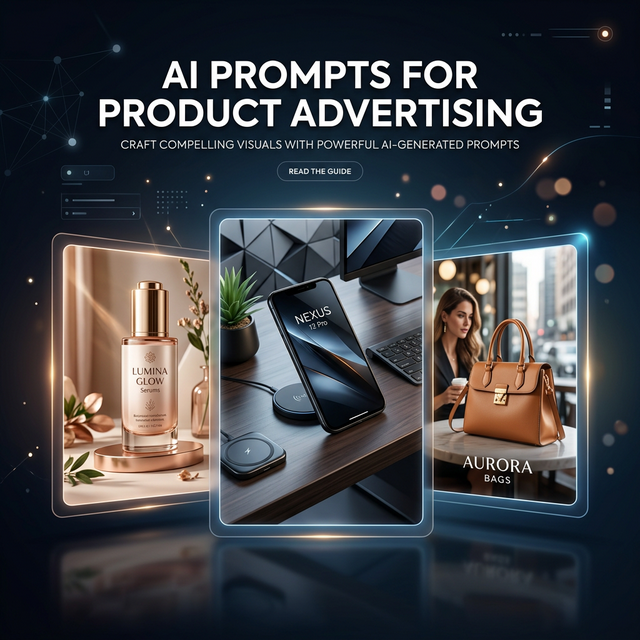
Random prompting creates random marketing results. The difference between a team that ships 20 usable ad creatives per week and one that struggles with 5 isn't talent — it's prompt architecture.
This guide gives you battle-tested prompt frameworks specifically designed for product advertising. Every template follows our PACE methodology, includes real output examples, and has been validated through production benchmarks.
Table of Contents
- Why Structured Prompts Matter for Ads
- The PACE Framework Explained
- Universal Base Template
- Industry-Specific Templates
- Conversion Modifier Library
- Variable System for Scale
- Quality Checklist Before Publishing
- Benchmark: Structured vs Ad-Hoc Prompting
- Common Prompt Mistakes to Avoid
- Advanced Techniques
- FAQ
Why Structured Prompts Matter for Ads
In our internal benchmark comparing structured prompt templates against free-form ad-hoc prompting, the results were decisive:
| Metric | Structured Templates | Ad-Hoc Prompts |
|---|---|---|
| First-pass ad usability | 66.7% | 33.3% |
| Text-safe composition success | 83.3% | 50.0% |
| Avg. revisions per approved asset | 1.9 | 3.7 |
| Major rework rate | 22.2% | 44.4% |
The takeaway is clear: structured prompts double your first-pass usability and cut revision cycles in half. For teams producing ads at scale, this means shipping twice as many approved creatives with the same team hours.
The PACE Framework Explained
Every high-performing product ad prompt should follow the PACE framework:
P — Product Anchor
Define what product is shown and what must remain accurate. This is the non-negotiable foundation.
- Product name, type, and key visual features
- Material, color, and form factor requirements
- What must be recognizable (logo placement, packaging, texture)
A — Audience Context
Specify who sees this ad and where it appears. Context shapes composition.
- Target audience demographics and psychographics
- Channel placement (Instagram feed, Facebook Stories, Google Display)
- Funnel stage (awareness, consideration, conversion)
C — Creative Direction
Guide the visual execution without micromanaging the AI.
- Style (photorealistic, lifestyle, flat-lay, editorial)
- Lighting (natural, studio, dramatic, soft)
- Camera angle (eye-level, top-down, three-quarter)
- Background context (environment, setting, atmosphere)
E — Execution Constraints
Set the guardrails that keep outputs brand-safe and production-ready.
- Brand colors and palette restrictions
- Forbidden elements (competitor logos, inappropriate imagery)
- Text-safe zones (where headline/CTA text will be overlaid)
- Aspect ratio requirements
- Mood and tone guidelines
Universal Base Template
Use this as your starting point for any product ad. Customize the bracketed variables for your specific product and campaign:
Create a high-conversion product ad image for [PRODUCT NAME].
Target audience: [AUDIENCE SEGMENT], appearing on [CHANNEL].
Primary message: [CORE VALUE PROPOSITION].
Visual direction: [STYLE] style, [LIGHTING] lighting, [CAMERA ANGLE] angle, [BACKGROUND CONTEXT] setting.
Composition: product is the clear focal point, include negative space for headline in [TEXT-SAFE ZONE LOCATION], maintain clean visual hierarchy.
Brand constraints: use [BRAND COLOR PALETTE], avoid [DISALLOWED ELEMENTS], maintain [MOOD/TONE] tone.
Output: [ASPECT RATIO], high detail, realistic material textures, commercial ad-ready quality.
💡 Pro tip: Always start with this base template, then layer in industry-specific details from the templates below.
Industry-Specific Templates
1. Beauty & Skincare
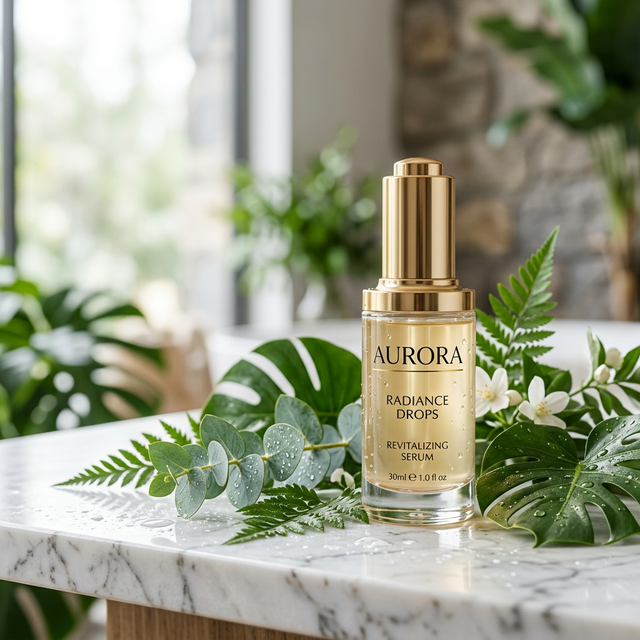
Create a premium skincare ad visual for [PRODUCT NAME] targeting [AUDIENCE: e.g., women 25-45 interested in anti-aging].
Scene: clean vanity setting with soft, diffused natural daylight and subtle reflections on product surface.
Show [TEXTURE CUE: e.g., golden serum with visible droplets] clearly, highlighting product transparency and luxury feel.
Include fresh botanical elements (green leaves, water droplets) to reinforce natural ingredients.
Mood: clinical-meets-luxury, trust-forward, aspirational but approachable.
Keep ample text-safe space in the top-left quadrant for headline overlay.
Brand palette: [COLORS], with gold and white accent tones.
Aspect ratio: 4:5, commercial ad-ready, high-resolution.
Why this works: Beauty buyers respond to texture cues and ingredient storytelling. The "clinical-meets-luxury" direction balances trust and aspiration — the two buying triggers for premium skincare.
2. Consumer Tech / Electronics
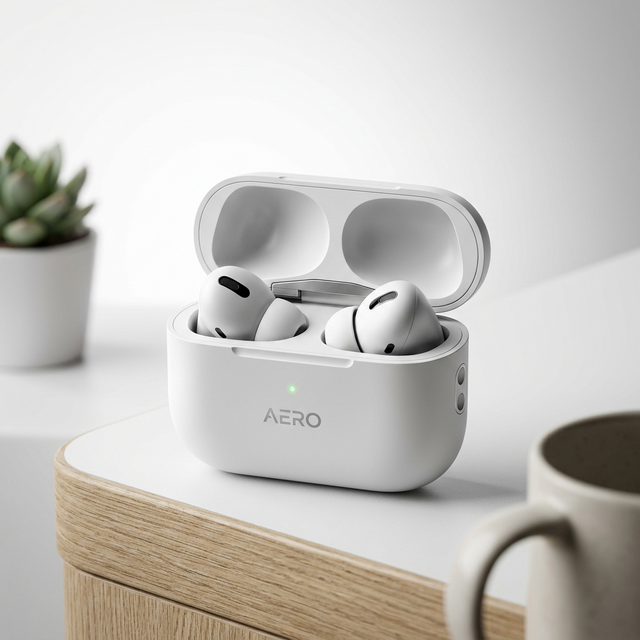
Generate a product ad image for [DEVICE NAME] focused on [KEY BENEFIT: e.g., noise cancellation, all-day battery].
Scene: modern minimalist desk environment with clean lines and lifestyle context (coffee cup, plant, notebook nearby).
Highlight product form factor with crisp, premium lighting and high-contrast edges that define the product silhouette.
Show the device at a three-quarter angle for maximum shape recognition.
No visual clutter, no unrelated objects competing for attention.
Clean background with subtle depth-of-field blur to emphasize product.
Color temperature: cool white with subtle warm accents.
Aspect ratio: 1:1 for feed and 16:9 for banner variants.
Commercial photography quality, Apple-style clean aesthetic.
Why this works: Tech products sell on form factor clarity and premium perception. The "Apple-style" reference gives the AI a clear benchmark for visual sophistication.
3. Fashion & Accessories
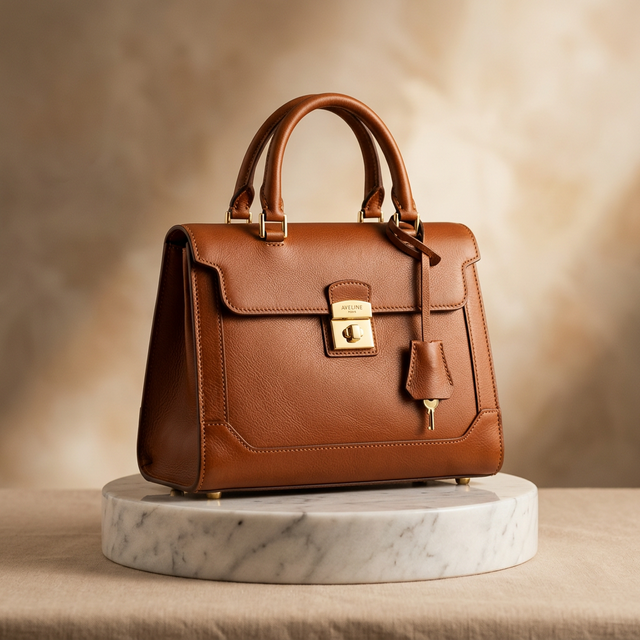
Create a campaign-ready ad visual for [PRODUCT: e.g., Italian leather crossbody bag in cognac brown].
Target audience: [SEGMENT: e.g., professional women 28-40], season: [SEASON: e.g., Fall/Winter 2026].
Styling direction: [LOOK: e.g., modern minimalist with warm earth tones], displayed on [SURFACE: e.g., marble pedestal with linen backdrop].
Maintain sharp product details: visible leather grain, precise stitching, hardware finish, edge painting.
Lighting: soft studio lighting with gentle directional shadow to add depth and dimension.
Brand palette only, no competing logos or text on product.
Include clean negative space on the left side for copy overlay.
Aspect ratio: 9:16 for Stories and 4:5 for feed. High-resolution, e-commerce catalog quality.
Why this works: Fashion ads depend on material texture and craftsmanship details. Specifying "visible leather grain, precise stitching" gives the AI specific quality targets that match buyer expectations.
4. Home & Kitchen
Create a conversion-focused ad image for [PRODUCT: e.g., ceramic non-stick cookware set].
Scene: real home kitchen moment — [TARGET USER: e.g., a home cook] actively using the product during meal preparation.
Show benefit in action: [BENEFIT: e.g., food sliding effortlessly off the non-stick surface, easy cleanup].
Background: warm, lived-in kitchen with natural afternoon light from a window.
Style: warm, trustworthy, practical — feels like a helpful recommendation, not a hard sell.
Composition: product center-right focus, headline-safe area on left third of frame.
Color palette: warm neutrals with pops of [BRAND COLOR] on the product.
Aspect ratio: 4:5, lifestyle photography aesthetic, relatable and aspirational.
Why this works: Home products convert best with "benefit-in-action" demonstration. Showing the product being used creates implicit social proof and reduces purchase anxiety.
5. Food & Beverage
Create a mouth-watering product ad for [PRODUCT: e.g., organic cold-pressed juice line, 3 flavors].
Scene: bright, airy surface (white marble or light wood) with fresh ingredients scattered naturally around bottles.
Show condensation on bottles for freshness cues, with vibrant juice colors visible through glass.
Include relevant fresh fruits/vegetables that match each flavor profile.
Lighting: bright, high-key overhead lighting with subtle shadows. Studio food photography quality.
Mood: fresh, healthy, energizing — feel like a farmer's market morning.
Leave clean top section for brand name and tagline overlay.
Aspect ratio: 1:1, food photography grade, vivid color saturation.
6. SaaS / Digital Products
Create a professional ad visual for [SOFTWARE/APP NAME] showcasing [KEY FEATURE: e.g., dashboard analytics, team collaboration].
Scene: stylized device mockup (laptop or phone) displaying the product interface, placed on a modern desk.
The screen should show a clean, readable UI with [SPECIFIC SCREEN: e.g., analytics dashboard with colorful charts].
Surrounding context: professional workspace elements (notebook, coffee, plant) suggesting productivity.
Lighting: natural office light, clean and professional, no harsh shadows.
Style: modern tech marketing aesthetic, crisp and trustworthy.
Background: soft gradient or blurred office environment.
Include clear space at top for headline. Aspect ratio: 16:9 for web banners, 1:1 for social.
Conversion Modifier Library
After writing your base prompt, append one or two conversion modifiers based on your campaign objective:
For CTR (Click-Through Rate) focus
Add: strong focal contrast between product and background, scroll-stopping first impression, vivid color pop on key product element, dramatic lighting that draws the eye immediately.For CVR (Conversion Rate) focus
Add: clarity of product benefit visible within 2 seconds, trustworthy visual realism, natural usage context, warm and approachable mood that reduces purchase hesitation.For Retargeting campaigns
Add: familiar visual cues matching previous brand touchpoints, reduced novelty, high brand continuity with consistent palette and style, subtle urgency through warm lighting.For Awareness campaigns
Add: cinematic, aspirational quality, broader environmental context showing lifestyle alignment, emotional storytelling through scene composition, premium brand positioning.For Seasonal campaigns
Add: [SEASON]-appropriate environmental cues (autumn leaves, summer sunlight, winter warmth, spring freshness), seasonal color palette adjustments, holiday or seasonal props if relevant.Variable System for Scale
To generate consistent ad variants without rewriting prompts from scratch, use a variable map in your team docs:
| Variable | Description | Example Values |
|---|---|---|
[PRODUCT] | Product name and type | "Aurora Serum 30ml bottle" |
[AUDIENCE SEGMENT] | Target audience | "Women 25-35, skincare enthusiasts" |
[CHANNEL] | Ad placement | "Instagram Feed", "Google Display" |
[CORE VALUE PROPOSITION] | Key selling message | "Visible results in 7 days" |
[STYLE] | Visual style | "editorial", "lifestyle", "flat-lay" |
[LIGHTING] | Light setup | "soft natural", "studio", "dramatic" |
[CAMERA ANGLE] | Perspective | "eye-level", "45-degree", "overhead" |
[BACKGROUND CONTEXT] | Setting | "marble surface", "outdoor cafe" |
[BRAND COLORS] | Color palette | "#D4AF37 gold, #FFFFFF white" |
[ASPECT RATIO] | Format size | "4:5", "1:1", "9:16", "16:9" |
[DISALLOWED ELEMENTS] | What to avoid | "no people, no competitor products" |
[MOOD] | Emotional tone | "luxurious", "playful", "trustworthy" |
How to use the variable system
- Create a master prompt template for each product category
- Build a variable spreadsheet with pre-approved values for each variable
- Generate variants by swapping variable values systematically
- Review outputs against your quality checklist
This lets junior marketers generate controlled creative variants without prompt engineering expertise.
For expanded template libraries and reusable patterns, integrate our Nano Banana Pro Prompts Guide into your content production SOP.
Quality Checklist Before Publishing
Before any AI-generated product ad goes live, verify these criteria:
Visual quality gates
- ✅ Product is the strongest focal element in the composition
- ✅ Key value proposition is visually understandable within 2 seconds
- ✅ Composition includes usable text-safe space for headlines/CTAs
- ✅ No distracting artifacts, extra fingers, or dimensional distortion
- ✅ Product proportions match real-world expectations
- ✅ Material textures look realistic (no plastic-looking metal, no flat-looking fabric)
Brand safety gates
- ✅ Brand colors and style constraints are respected
- ✅ No unintended text, logos, or brand-adjacent imagery
- ✅ Visual tone matches the target channel and campaign stage
- ✅ No culturally insensitive or inappropriate content
- ✅ Product packaging and labeling are accurate (if shown)
Production readiness gates
- ✅ Resolution is sufficient for the target placement
- ✅ Aspect ratio matches channel requirements
- ✅ Image exports cleanly without compression artifacts
- ✅ Text overlay areas are genuinely clean (no busy patterns)
Benchmark: Structured vs Ad-Hoc Prompting
We tested structured PACE templates against free-form prompting across 3 product verticals (beauty, consumer tech, home), 36 total generation tasks:
| Metric | PACE Templates | Free-Form Prompts | Improvement |
|---|---|---|---|
| First-pass ad usability | 66.7% (12/18) | 33.3% (6/18) | +100% |
| Text-safe composition | 83.3% | 50.0% | +66.7% |
| Avg. revisions per asset | 1.9 | 3.7 | -48.6% |
| Major rework rate | 22.2% | 44.4% | -50.0% |
| Time to approved asset | 14 min | 28 min | -50.0% |
What this means for your team
- Double your usable output with the same number of generations
- Cut revision cycles in half, freeing up designer and reviewer time
- Ship campaigns faster — 14 minutes to approved asset vs 28 minutes
- Reduce creative waste — fewer credits burned on unusable outputs
The investment in building a structured prompt system pays for itself within the first production week.
Common Prompt Mistakes to Avoid
❌ Mistake 1: Too many style instructions with no priority
Bad: "Create a cinematic, photorealistic, watercolor-inspired, pop art, minimalist product photo..."
Good: "Create a photorealistic product ad. Style priority: clean editorial photography with soft natural lighting."
Why: Conflicting style instructions cause the AI to blend styles randomly. Pick one primary style direction.
❌ Mistake 2: Weak product anchoring
Bad: "Generate a beautiful image with nice lighting and a product somewhere in the scene."
Good: "Product is the primary focal element, occupying 40-60% of the frame. Center-right placement with sharp focus and blur on background elements."
Why: Without explicit product anchoring, the AI may prioritize background aesthetics over product visibility.
❌ Mistake 3: Missing audience and channel context
Bad: "Make a product photo for marketing."
Good: "Product ad for Instagram Feed (4:5), targeting professional women 28-40 interested in premium skincare. Style: aspirational but approachable."
Why: Context shapes composition decisions. An Instagram Story vertical requires different framing than a Google Display banner.
❌ Mistake 4: No execution constraints
Bad: "Create a product ad that looks professional."
Good: "Brand palette: deep navy (#1B2838) and warm gold (#D4AF37). No red tones. No visible faces. Text-safe zone: upper 25% of frame must be clean for headline overlay."
Why: Without constraints, every generation becomes a style lottery. Constraints are what make outputs production-ready.
❌ Mistake 5: Writing novel-length prompts
Bad: 500+ word prompts describing every pixel of the desired output.
Good: 80-150 word prompts covering the PACE framework with clear priority order.
Why: Overly long prompts often confuse AI models, causing them to emphasize later instructions over earlier ones. Concise, structured prompts produce more consistent results.
Advanced Techniques
Multi-angle product ad sets
Generate consistent product views for carousel ads:
Generate a 4-image product photography set for [PRODUCT]:
1. Hero shot: three-quarter angle showing full product form, lifestyle background
2. Detail shot: extreme close-up of key feature ([FEATURE]), shallow depth of field
3. Scale shot: product in hand or in-use context, showing real-world size
4. Flat-lay: top-down arrangement with lifestyle accessories

Maintain consistent lighting (soft studio), color palette ([COLORS]), and background style across all four images.
Aspect ratio: 1:1, high-resolution, e-commerce quality.
A/B test variant generation
Create controlled variants for campaign testing:
Generate two versions of a product ad for [PRODUCT]:

Version A (emotional appeal): Warm, lifestyle setting showing the product in a cozy home environment. Golden hour lighting, emphasize comfort and belonging.

Version B (rational appeal): Clean, clinical setting showing the product with feature callouts visible. Bright, even lighting, emphasize quality and precision.

Both versions: same product placement (center-right), same aspect ratio (4:5), same amount of text-safe space (top-left quadrant). Only the emotional direction differs.
Campaign-consistent variant sets
Generate channel-specific variants from one creative direction:
Create 3 format variants of the same product ad concept for [PRODUCT]:
1. Instagram Feed: 1:1 square, product centered, balanced composition
2. Instagram Stories: 9:16 vertical, product in lower third, lifestyle context fills upper two-thirds
3. Facebook Feed: 4:5 vertical, product center-right, text-safe zone on left

All variants: same [STYLE] direction, same [LIGHTING], same [BACKGROUND CONCEPT], same [BRAND COLORS].
Maintain visual continuity so all three feel like part of the same campaign.
FAQ
What are the best Nano Banana prompts for product ads?
The best prompts follow the PACE framework: Product anchor, Audience context, Creative direction, and Execution constraints. This structure consistently produces 2x higher first-pass usability compared to free-form prompting. See the specific industry templates above for copy-paste examples.
How many variables should one prompt include?
Start with 5-7 core variables (product, audience, style, lighting, background, colors, aspect ratio). Too many variables reduce consistency and slow decision-making. Add more only when your baseline templates are delivering stable results.
Should I use one prompt for every ad channel?
No. Keep a core template for your creative direction, then adapt composition and aspect ratio per channel. An Instagram Story (9:16) requires fundamentally different framing than a Google Display banner (16:9), even with the same product and style.
How many variants should I generate per concept?
A practical starting point is 4-8 variants per concept. Generate them, score each against your quality checklist, and shortlist the top 2-3 for final review. This gives you enough options for A/B testing without overwhelming your review team.
What matters most for conversion creatives?
Clarity of product benefit, product focus, and fast visual comprehension — in that order. Users typically see an ad for under 2 seconds. If the product and its value aren't immediately clear, no amount of artistic quality will compensate.
Can I use the same prompts with other AI image tools?
The PACE framework is tool-agnostic, but the specific modifier phrases and constraint syntax are optimized for Nano Banana's Gemini 3 Pro model. You may need to adapt formatting for other tools.
Start Building Your Ad Production System
Structured prompts aren't just about individual images — they're the foundation of a repeatable ad production system that scales with your team.
Your next steps
- Copy a template from this guide that matches your product category
- Customize variables for your specific brand and product
- Generate your first batch using our AI Image Generator
- Score outputs against the quality checklist above
- Iterate and refine your template based on what performs best
For the complete prompt library covering 40+ use cases beyond product ads, explore our Nano Banana Pro Prompts Guide.
Ready to scale your creative production? Check pricing plans and choose the tier that matches your campaign output volume.