
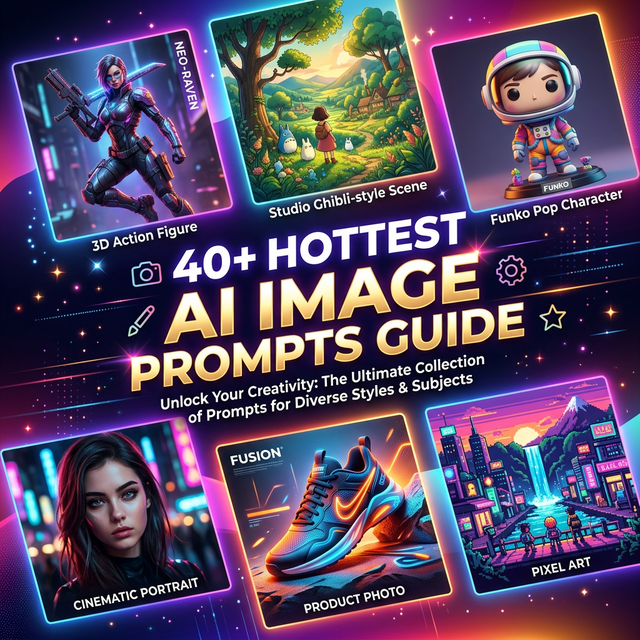
40+ Hottest Nano Banana Pro Prompts (Copy & Paste) — 2026 Ultimate Guide
The most comprehensive collection of Nano Banana Pro prompts on the internet. Every prompt is copy-paste ready, tested with real outputs, and organized by category for fast access.
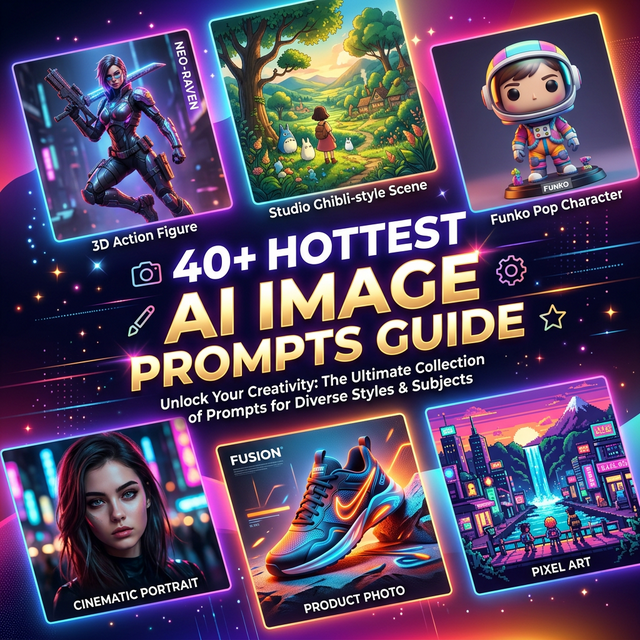
Whether you want to turn photos into 3D action figures, create Studio Ghibli scenes, generate professional product ads, or edit portraits with AI precision — this guide has the exact prompts you need.
All prompts are optimized for Nano Banana Pro powered by Google's Gemini 3 Pro image model. Simply copy, paste, upload your reference image, and generate.
Table of Contents
- Nano Banana Pro vs Nano Banana
- Part 1: Image Effects (12 Prompts)
- Part 2: Portrait Editing (4 Prompts)
- Part 3: Image Editing Tools (13 Prompts)
- Part 4: Pro Exclusive Features (15 Prompts)
- How to Use Nano Banana AI
- Prompt Writing Tips
- How to Identify AI Generated Images
- FAQ
Nano Banana Pro vs Nano Banana
Before diving into the prompts, understand the key differences between Pro and standard versions:
| Feature | Nano Banana Pro | Nano Banana |
|---|---|---|
| Model Base | Gemini 3 Pro Advanced Model | Gemini 2.5 Flash Basic Model |
| Semantic Understanding | Deep multi-layered comprehension | Basic prompt interpretation |
| Resolution | Up to 4K (2048×2048+) | Standard (1024px) |
| Text Rendering | Enhanced, multi-language support | Basic with limitations |
| Reference Images | Up to 14 images | Limited references |
| Creative Control | Camera angle, lighting, depth of field | Basic editing controls |
| Google Search | Real-time data integration | Not available |
| Best For | Enterprise branding, ads, professional content | Casual, social media use |
Bottom line: Nano Banana Pro delivers significantly better results in semantic understanding, resolution, creative control, and text rendering. For professional use, Pro is worth the investment.
Part 1: Image Effects
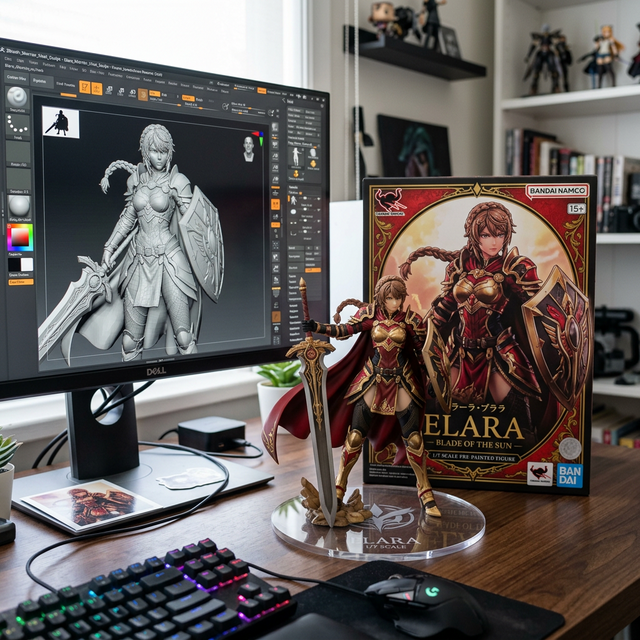
1. 3D Anime Action Figure
Transform any character photo into a stunning collectible action figure.
✅ Prompt:
Create a 1/7 scale commercialized figure of the character in the illustration, in a realistic style and environment. Place the figure on a computer desk, using a circular transparent acrylic base without any text. On the computer screen, display the ZBrush modeling process of the figure. Next to the computer screen, place a BANDAI-style toy packaging box printed with the original artwork.💡 Tip: Upload a clear character reference image. Specify the figure style you want — chibi, realistic, or super-deformed for different results.
2. Chibi Knitted Doll
Turn any image into an adorable hand-crocheted yarn doll.
✅ Prompt:
A close-up, professionally composed photograph showcasing a hand-crocheted yarn doll gently cradled by two hands. The doll has a rounded shape, featuring the cute chibi image of the [upload image] character, with vivid contrasting colors and rich details. The hands holding the doll are natural and gentle, with clearly visible finger postures, and natural skin texture and light/shadow transitions, conveying a warm and realistic touch. The background is slightly blurred, depicting an indoor environment with a warm wooden tabletop and natural light streaming in from a window, creating a comfortable and intimate atmosphere. The overall image conveys a sense of exquisite craftsmanship and cherished warmth.3. Character Gashapon Capsule
Create miniature collectible capsule dioramas with any character.
✅ Prompt:
A detailed, transparent gashapon capsule diorama, held between fingers, featuring [NAME] in their [ICONIC POSE / STYLE]. Inside: [short description of figure's look, clothing, and accessories], with background elements such as [relevant setting: stadium, stage, lecture hall, etc.]. Lighting should be dramatic and cinematic, matching their theme. The capsule has a transparent top and a colored base [choose fitting color: e.g. royal blue, gold, black, red], decorated with [motifs related to the person]. The base is labeled with [NAME or NICKNAME] in a matching font style. The design should look like a miniature collectible, with photorealistic detail and soft bokeh.📝 Note: Replace all [BRACKETED] placeholders with your specific descriptions.
4. Character Plush Toy
Turn any character into a cuddly, collectible plush toy.
✅ Prompt:
A soft, high-quality plush toy of [CHARACTER], with an oversized head, small body, and stubby limbs. Made of fuzzy fabric with visible stitching and embroidered facial features. The plush is shown sitting or standing against a neutral background. The expression is cute or expressive, and it wears simple clothes or iconic accessories if relevant. Lighting is soft and even, with a realistic, collectible plush look. Centered, full-body view.5. iPhone Selfie Style
Generate hyper-realistic casual iPhone selfie images.
✅ Prompt:
Please draw an extremely ordinary and unremarkable iPhone selfie, with no clear subject or sense of composition — just like a random snapshot taken casually. The photo should include slight motion blur, with uneven lighting caused by sunlight or indoor lights, resulting in mild overexposure. The angle is awkward, the composition is messy, and the overall aesthetic is deliberately plain — as if it were accidentally taken while pulling the phone out of a pocket. The subjects are [Names], taken at night, next to the [Location].6. Chibi Emoji Stickers
Create a sheet of cute, expressive emoji stickers.
✅ Prompt:
Making a playful peace sign with both hands and winking. Tearful eyes and slightly trembling lips, showing a cute crying expression. Arms wide open in a warm, enthusiastic hug pose. Lying on their side asleep, resting on a tiny pillow with a sweet smile. Pointing forward with confidence, surrounded by shining visual effects. Blowing a kiss, with heart symbols floating around. Maintain the chibi aesthetic. Exaggerated, expressive big eyes. Soft facial lines. Background: Vibrant red with star or colorful confetti elements for decoration. Leave some clean white space around each sticker. Aspect ratio: 9:167. Funko Pop Style
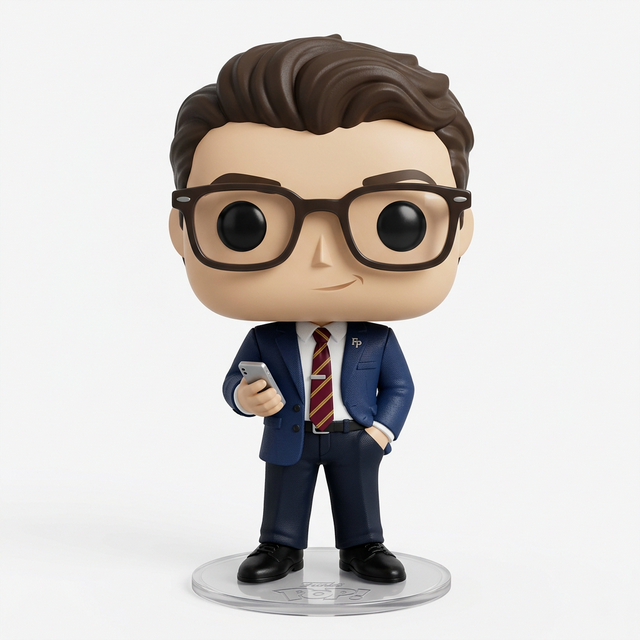
Convert any photo into a collectible Funko Pop vinyl figure.
✅ Prompt:
Create a detailed 3D render of a chibi Funko Pop figure, strictly based on the provided reference photo. The figure should accurately reflect the person's appearance, hairstyle, attire, and characteristic style from the photo. High detail, studio lighting, photorealistic texture, pure white background.8. Ghibli Style
Transform any photo into a magical Studio Ghibli animation scene.
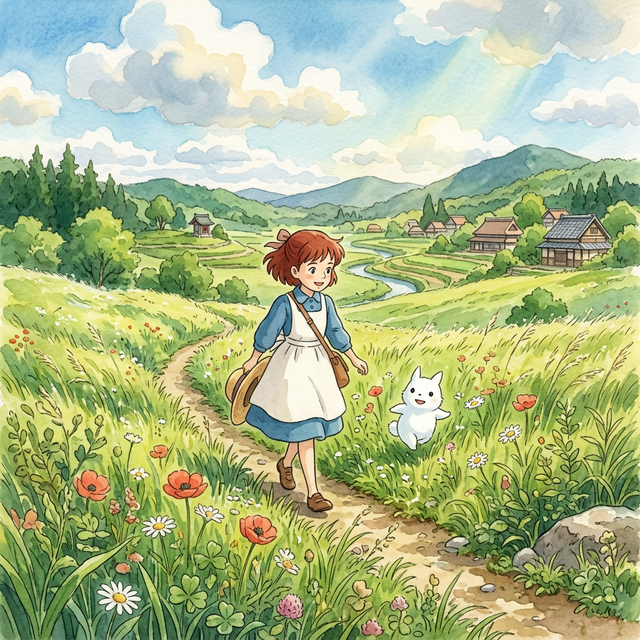
✅ Prompt:
Redraw this photo in Ghibli style💡 Tip: This simple prompt works surprisingly well. For more control, add details like: "with lush green backgrounds, soft dreamy lighting, and watercolor-like textures in Miyazaki's signature pastoral style."
9. Game UI Design
Convert characters into immersive rhythm game interface screenshots.
✅ Prompt:
A vibrant rhythm dance game screenshot featuring the 3D animated character from the reference photo, keeping its unique style, hat, outfit, and confident dance pose. Immersive cinematic lighting with neon pink and purple glow, glossy reflective dance floor shining under spotlights, and dynamic 3D cartoon style. Rhythm game interface with immersive UI: score meter at the top, colorful music waveform animations synced to the beat, stage timer countdown, and floating combo numbers. Highly detailed, game-like atmosphere with energy bars, neon particle effects, and immersive arcade rhythm game HUD elements. Ultra-detailed, cinematic, immersive, 3D animation.10. Multi-Image Fusion
Seamlessly merge multiple photos into one cohesive visual masterpiece.
✅ Prompt:
Combine multiple images ([Image1], [Image2], [Image3], …) into a single cohesive image. Keep all key subjects recognizable and maintain their proportions and details. Blend the images naturally with consistent lighting, shadows, perspective, and style. Photorealistic, high-resolution, seamless integration.11. Style Fusion
Mix the artistic style of one image with the content of another.
✅ Prompt:
Transform this image [Image1] into the artistic style of [Image2]. Keep the main subject, composition, and details from [Image1], but apply the colors, textures, and overall aesthetic of [Image2]. High-quality, [illustration] style, consistent details.12. Virtual Try-On
Instantly swap outfits to preview different clothing styles.
✅ Prompt:
Keep the character in [Image1] unchanged, but replace her pant with the outfit in [Image2]. Maintain the same pose, body proportions, and facial features, while applying the color, texture, and style of the pants in [Image2]. High-quality, realistic, consistent detail.Part 2: Portrait Editing
13. Facial Expression Control
Precisely adjust facial expressions — smiles, surprise, or any emotion.
✅ Prompt:
Keep the person from [Image1] unchanged, but change their facial expression to [desired expression, e.g., smiling, surprised, angry]. Preserve the pose, body proportions, hairstyle, and overall appearance. Maintain realistic lighting, shadows, and photorealistic details.14. Pose Control
Change body poses for dynamic or natural stances while preserving identity.
✅ Prompt:
Take the two men and place them in the exact poses of the man in green carrying the man in red. Preserve their identities, body proportions, and clothing details. Ensure the pose is natural and realistic, with consistent lighting, shadows, and perspective. Photorealistic, high-resolution result.15. Body Reshaping
Modify body proportions while maintaining natural, realistic anatomy.
✅ Prompt:
Reshape the body of the person in [Image1] into a [target body type]. Keep the face, identity, hairstyle, and clothing consistent. Ensure realistic anatomy, natural proportions, and photorealistic details.16. 3x3 Grid Portraits
Generate a 3x3 grid of varied portraits in different settings and poses.
✅ Prompt:
Using the uploaded photo as a reference, generate a set of 9 vibrant half-length portraits featuring natural life. Each portrait should show a different pose and be placed in a unique setting, with rich, colorful details that highlight the diversity of nature.Part 3: Image Editing Tools
17. Background Replacement
Swap any background while keeping the subject perfectly intact.
✅ Prompt:
Replace the background of [Image1] with [desired background description, e.g., a beach, a forest, a city skyline]. Keep the main subject (person/object) unchanged, maintaining original proportions, lighting, and details. Ensure the subject blends naturally with the new environment. Photorealistic, high-resolution, seamless integration.18. Add Objects to Scene
Naturally insert new elements into any image.
✅ Prompt:
Add [desired element, e.g., a tree, a lamp, a dog] to [Image1]. Place it naturally in the scene, matching the lighting, perspective, and style. Keep the original elements unchanged. Photorealistic, seamless integration.19. Remove Objects from Scene
Cleanly remove unwanted elements with natural fill.
✅ Prompt:
Remove [element to remove, e.g., a person, a car, a sign] from [Image1]. Fill the background naturally to maintain the scene's continuity, lighting, and details. Keep all other elements unchanged. Photorealistic, high-resolution.20. Change Camera Angle
View the same subject from multiple perspectives.
✅ Prompt:
Recreate the person from [Image1] in four different camera perspectives. Keep the subject's identity, body proportions, and clothing consistent across all four images. Maintain the same background environment as [Image1], with photorealistic lighting, natural shadows, and high-quality details.

Generate four variations side by side:
1. Bird's-eye view (from above).
2. Rear view (from behind).
3. Side profile view.
4. Close-up portrait view.
21. Edit Image Text
Modify or replace text within images seamlessly.
✅ Prompt:
Edit the text in [Image1]. Replace the existing text with "[your new text]" while keeping the background, design, and other elements unchanged. Match the font style, size, and color to look natural and consistent with the image. Photorealistic, seamless integration.22. Time-Lapse Generation
Generate scenes showing natural time progression.
✅ Prompt:
Generate an image of the same scene as [Image1], but showing how it looks 10 minutes later. Keep the environment and style consistent, but add natural changes over time such as light, weather, people and so on. Photorealistic, seamless continuity.23. Object Extraction
Isolate specific objects for clean e-commerce product shots.
✅ Prompt:
Extract the clothing from [Image1] and present it as a clean e-commerce product photo. Remove the model's body completely. Keep the outfit in natural 3D shape, with realistic fabric folds, seams, and textures. Display the garment as if photographed on a mannequin or neatly laid flat, centered on a pure white or transparent background. High-resolution, professional lighting, suitable for online fashion catalog.24. Image Enhancement
Upscale quality, sharpen details, and boost clarity.
✅ Prompt:
Enhance [Image1] to improve overall quality and detail. Keep the original composition, colors, and style intact. Increase resolution, sharpness, texture clarity, and lighting realism. Output as a photorealistic, high-resolution image.25. Weather Change
Instantly transform scene weather conditions.
✅ Prompt:
Change the weather in [Image1] to [desired weather, e.g., rainy, snowy, foggy, sunny]. Keep the main subject and overall scene intact. Adjust lighting, shadows, colors, and environmental effects to match the new weather. Photorealistic, seamless integration, high-resolution.26. Color Adjustment
Shift the entire color palette to match any mood or brand.
✅ Prompt:
Change the colors in [Image1] to [desired color/style, e.g., warm tones, cool blue tones, pastel colors]. Keep the main subject and composition intact. Adjust lighting, shadows, and overall color balance to match the new color scheme. Photorealistic, high-resolution, natural-looking result.27. Image Replacement
Seamlessly swap specific elements within a composition.
✅ Prompt:
Replace [target element or area] in [Image1] with [new element or reference, e.g., a different person, object, or scene]. Keep all other parts of the image unchanged. Ensure the replacement blends naturally with lighting, perspective, and overall style. Photorealistic, high-resolution, seamless integration.28. Image Outpainting
Extend image borders to reveal more of the scene.
✅ Prompt:
Extend [Image1] beyond its original borders using outpainting. Keep the main subject and composition intact. Generate new content around the edges that matches the style, colors, lighting, and perspective of the original image. Photorealistic, high-resolution, seamless integration.💡 Advanced — Aspect Ratio Control:
Steps:
1. Upload "Original image to outpaint"
2. Upload "Aspect ratio template image"
3. Enter prompt:

Redraw the content of Figure 1 onto Figure 2, add more detailed content to Figure 1 to fit the aspect ratio of Figure 2, completely clear the content of Figure 2, and only retain the aspect ratio of Figure 2.
29. Line Art to Image
Convert sketches and line drawings into fully rendered images.
✅ Prompt:
Convert the line art in [Image1] into a fully colored and detailed image. Preserve all original outlines and compositions. Apply [desired style, e.g., photorealistic, anime, cartoon, digital painting] with realistic lighting, shadows, and textures. High-resolution, natural, seamless rendering.Part 4: Pro Exclusive Features
30. AI Interior Design (Step-by-Step)
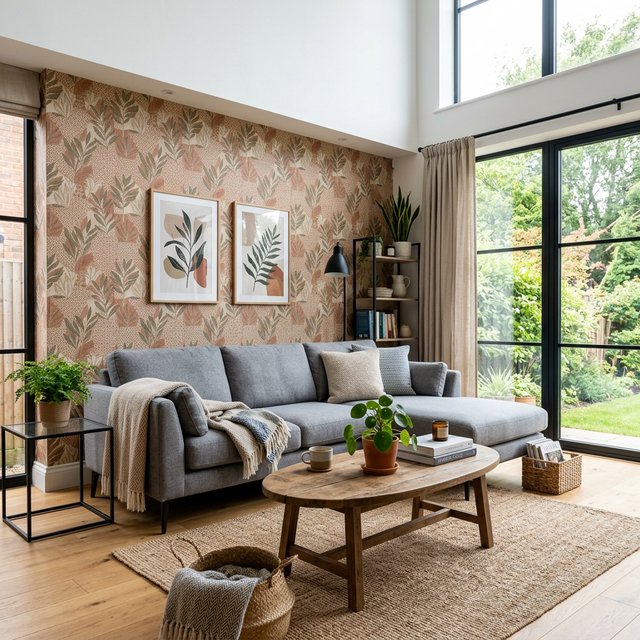
Transform empty rooms into beautifully furnished spaces.
✅ Step 1 Prompt:
Step one: Add a comfortable gray sofa and a wooden coffee table in the center, matching the room's contemporary style, photorealistic render.✅ Step 2 Prompt:
Step two: Add more furniture-like items to the foreground and more daily necessities on the table. Also, change the wallpaper to something warmer.31. Ingredients to Dish
Show raw ingredients transformed into a beautifully plated meal.
✅ Prompt:
Here are the items available: [List of items]. Based on these items, create an image of a [type of object/scene] that can be made or represented by combining them. The composition should make logical sense, considering the relationship between the items. Ensure the image is [visual style]. It should be with appropriate proportions and clear placement of each item.32. Anatomical Illustrations
Generate detailed, educational anatomical diagrams.
✅ Prompt:
Draw a bilaterally symmetrical frontal anatomical illustration of the [Character], styled similarly to an infographic. The image should show the creature's external features on both sides, with its internal anatomy partially exposed. Detailed text should flank the image, explaining the creature's biology, abilities, behavior, habitat, and the specific functions of its anatomical structures. The overall design should be clear, informative, and in the style of a scientific illustration.33. 16-Bit Game Character
Transform any photo into retro pixel art game characters.
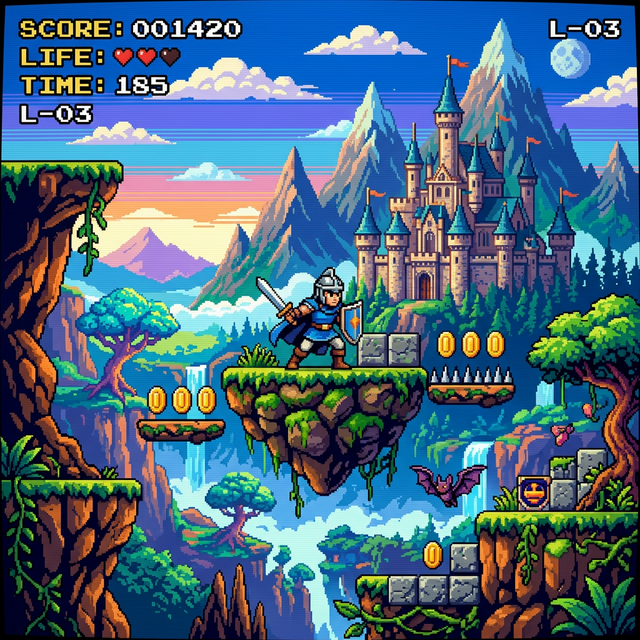
✅ Prompt:
Recreate this [Character] as a 16-bit video game character, and place the character in a level of a 2D 16-bit platform video game.34. Polaroid Style Photos
Create nostalgic retro Polaroid-style snapshots.
✅ Prompt:
Take a picture with a Polaroid camera. The photo should look like a normal photo, without any clear subject or props. The photo should have a slight blur and a consistent light source, such as a flash from a dark room, spread throughout the photo. Do not change the faces. Replace the background behind the two people with a white curtain.35. AI Saree
Dress any portrait in beautiful traditional saree clothing.
✅ Prompt:
Create A soft, sunlit portrait wearing a flowing sheer yellow saree with delicate floral embroidery. Sit gracefully against a plain wall, bathed in warm natural light with a triangular patch of sunlight casting artistic shadows. Hold a vibrant bouquet of sunflowers close to the chest, and a small white flower is tucked behind the ear. Gentle expression, loose hair strands moving slightly, and the dreamy golden glow create a serene, poetic, and romantic atmosphere.36. AI Hug Younger Self
Create an emotional scene of hugging your younger self.
✅ Prompt:
Take a photo taken with a Polaroid camera. The photo should look like an ordinary photograph, without an explicit subject or property. The photo should have a slight blur and a consistent light source, like a flash from a dark room, scattered throughout the photo. Don't change the face. Change the background behind those two people with white curtains. Make it look like both people in the reference picture are hugging each other.37. AI Black & White Studio Portrait
Generate timeless, professional black and white portraits.
✅ Prompt:
Please generate a top-angle and close-up black and white portrait of my face, focused on the head facing forward. Use a 35mm lens look, 10.7K 4HD quality. Proud expression. Deep black shadow background - only the face, the upper chest, and the shoulder.38. AI Cinematic Portrait
Create dramatic, movie-poster quality portraits.
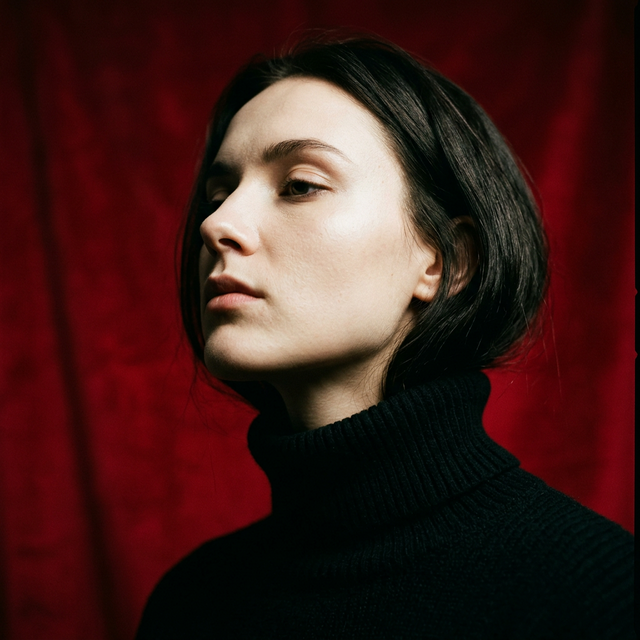
✅ Prompt:
Create a vertical portrait shot using the exact same face features, characterized by stark cinematic lighting and intense contrast. Captured in a slightly low, upward-facing angle that dramatized the subject's jawline and neck, the composition evokes quite dominance and sculptural elegance. The background is a deep, saturated crimson red, creating a bold visual clash with the model's luminous skin and dark wardrobe.39. Internal Structure Diagram
Generate detailed exploded-view product diagrams.
✅ Prompt:
Ultra-detailed exploded view of a product, metallic parts and electronic components floating in mid-air, perfectly aligned, revealing inner structure, futuristic technology aesthetic, 8K resolution, soft cinematic lighting, highly realistic.40. Photo Zoom (Pro Exclusive)
Use 100x zoom to reveal microscopic-level detail.
✅ Prompt:
Zoom in 100x on this image, maintaining the original aspect ratio. Ensure that the image details remain sharp and clear, revealing intricate textures, patterns, and elements without distortion, while preserving the natural colors and quality.41. Detailed Storyboard (Pro Exclusive)
Auto-generate cinematic storyboards from any image.
✅ Prompt:
Create a storyboard from the uploaded image, highlighting key moments and transitions with cinematic angles, camera movements, and framing that capture the scene's mood and narrative flow.42. Text to Logo (Pro Exclusive)
Generate creative, professional logo designs.
✅ Prompt:
Turn these 8 Logos into sophisticated minimalistic logos to make letters from realistic food to express the meaning of this word. Composition: rendering of all logos on a single solid white background.43. Semantic Recipe Generation (Pro Exclusive)
Create beautiful recipe infographics from text descriptions.
✅ Prompt:
Create an infographic that shows how to make Thai Tom Yum Goong Soup, with ingredients and recipe in it.44. Change Focus (Pro Exclusive)
Adjust depth of field and focal point in any image.
✅ Prompt:
Focus on the background trees and blanket of this image, blur this kid.How to Use Nano Banana AI
Getting started with Nano Banana is straightforward. Follow these four steps:
Step 1: Access the AI Image Generator
Visit our AI Image Generator to start creating. The interface is designed for immediate use — no tutorials needed.
⚠️ Note: Nano Banana Pro features require a paid plan. Free users can access standard Nano Banana capabilities.
Step 2: Upload Your Reference Images
Upload clear, high-quality photos or sketches as your base. Better input quality = better output quality. Nano Banana Pro supports up to 14 reference images simultaneously.
Step 3: Enter Your Prompt
Copy any prompt from this guide and paste it into the prompt field. Replace the bracketed placeholders with your specific details. The more specific your prompt, the better your result.
Step 4: Generate, Review, and Iterate
Click generate and review the output. If it's not perfect on the first try, refine your prompt and regenerate. Most users achieve excellent results within 2-3 iterations.
Prompt Writing Tips
Master these six principles to get consistently better results from every prompt:
1️⃣ Start with Action Verbs
Begin every prompt with a clear action: "Create", "Generate", "Transform", "Draw", or "Redraw". This gives the AI a clear instruction type.
Example:
"Create an image of a smiling young woman wearing a flowing red dress, gently cradling a golden retriever puppy in her arms, standing on a grassy park path with sunlight filtering through the trees. Photorealistic style, with natural shadows and vivid colors."2️⃣ Iterate and Refine Progressively
Don't try to get everything perfect in one prompt. Start broad, then add specific details in follow-up generations:
- Round 1: Basic subject, pose, and setting
- Round 2: Add lighting, mood, and style direction
- Round 3: Fine-tune details, colors, and composition
3️⃣ Specify Art Styles Explicitly
Include clear style keywords to guide the aesthetic: "Watercolor", "Cyberpunk", "Anime", "Photorealistic", "Oil painting", "Minimalist", "Art Deco".
4️⃣ Provide Scene Context
Context about time of day, season, emotional atmosphere, and environmental details dramatically improves output relevance:
"Golden hour lighting, late autumn afternoon, warm nostalgic atmosphere"5️⃣ Experiment with Variations
Try different perspectives, color palettes, and lighting conditions to explore creative possibilities. Generate 4-6 variants, then select the best.
6️⃣ Match Lighting Across Edits
When replacing objects, blending images, or adjusting poses, always specify consistent lighting direction and intensity to maintain realism.
How to Identify AI Generated Images
As AI image generation becomes more sophisticated, identifying AI-generated content is increasingly important.
SynthID by Google
Google's SynthID technology embeds invisible watermarks into AI-generated images. You can verify any image by uploading it to the Gemini app.
Gemini Sparkle Watermark
Gemini 3 Pro adds a visible "Gemini Sparkle" watermark to images generated by free users and Google AI Pro tier users.
For professionals who need clean, watermark-free outputs:
- Google AI Ultra subscribers can remove visible watermarks
- Images generated via Google AI Studio developer tools are watermark-free
- Nano Banana Pro offers the same Gemini 3 Pro image quality without visible watermarks through our platform
FAQ
What is Nano Banana Pro?
Nano Banana Pro is an AI image generation platform powered by Google's Gemini 3 Pro model. It offers advanced features including 4K resolution, up to 14 reference images, enhanced text rendering, and real-time Google Search integration for professional-grade image creation.
Are these prompts free to use?
Yes! All prompts in this guide are free to copy and use. You can use them with Nano Banana Pro or adapt them for other AI image tools. For the best results, we recommend using them with our AI Image Generator.
Do I need Nano Banana Pro for all prompts?
Most prompts work with both standard Nano Banana and Pro versions. However, prompts marked (Pro Exclusive) — including Photo Zoom, Storyboard, Text to Logo, Recipe Generation, and Change Focus — require a Pro subscription for optimal results.
How do I get better results from these prompts?
Three key strategies: (1) Upload high-quality reference images, (2) be specific about style, lighting, and composition in your prompts, and (3) iterate — use each output as feedback to refine your next prompt.
Can I use these prompts commercially?
Yes. Images generated through Nano Banana Pro are suitable for commercial use under our platform's terms of service. This includes social media ads, e-commerce product images, marketing materials, and editorial content.
How many images can I generate?
Generation limits depend on your plan tier. Free users get a limited monthly quota, while paid plans offer significantly higher limits suitable for professional production workflows. Check Pricing for details.
Start Creating Now
You now have 44 battle-tested prompts covering every major AI image generation use case. Whether you're creating viral social content, professional product ads, or artistic masterpieces, these templates will accelerate your creative workflow.
Your next steps:
- Bookmark this page — come back whenever you need a prompt template
- Try your first prompt in our AI Image Generator
- For product ads, check our specialized Product Ad Prompts Guide
- Scale your production with the right pricing plan
Last Updated: February 27, 2026
Prompts Count: 44 ready-to-use templates
Reading Time: ~20 minutes