Super stylish poster subject description An...
Ratio 9:16Text-to-Image
Creator Reference:@underwoodxie96
Original Post

Copy this Nano Banana Pro text-to-image prompt to create portrait...

Copy this Nano Banana Pro text-to-image prompt to create portrait concepts with editorial styling and clean minimalist composition. Best in 9:16 framing.

Master PromptClick to select all

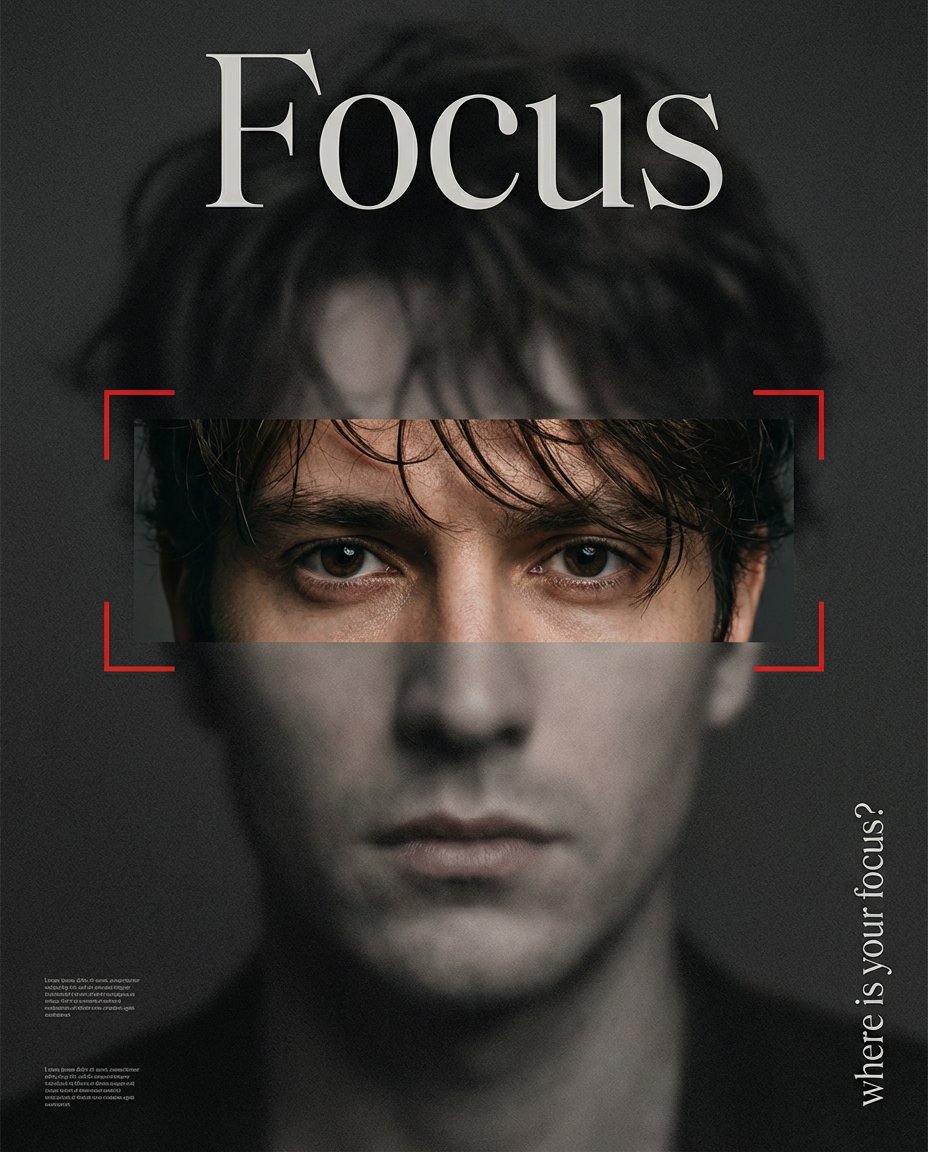
Super stylish poster! { "subject": { "description": "An extreme close-up editorial portrait poster: a gritty frosted black overlay covers the full image, while a horizontal rectangular cutout across the eyes reveals original color and clarity, emphasized by red focus brackets.", "mirror_rules": null, "age": "adult", "expression": { "eyes": { "look": "direct and intent", "energy": "focused", "direction": "toward viewer" }, "mouth": { "position": "neutral", "energy": "calm" }, "overall": "serious, concentrated" }, "face": { "preserve_original": true, "makeup": null }, "hair": { "color": "dark brown", "style": "slightly tousled, loose strands over forehead", "effect": "editorial" }, "body": { "frame": null, "waist": null, "chest": null, "legs": null, "skin": { "visible_areas": ["face", "eyes area (in cutout)"], "tone": "natural tone inside cutout; desaturated elsewhere", "texture": "grainy and softened by frosted overlay; sharper inside cutout", "lighting_effect": "low-key, moody contrast" } }, "pose": { "position": "front-facing close-up", "base": "static portrait", "overall": "centered, still" }, "clothing": { "top": { "type": null, "color": null, "details": null, "effect": null }, "bottom": { "type": null, "color": null, "details": null } } }, "accessories": { "headwear": null, "jewelry": null, "device": null, "prop": null }, "photography": { "camera_style": "luxury editorial poster design over a portrait base", "angle": "straight-on", "shot_type": "extreme close-up portrait", "aspect_ratio": "4:5 vertical poster", "texture": "matte, gritty grain, frosted-glass blur, subtle noise", "lighting": "dark, moody low-key lighting", "depth_of_field": "soft overall; perceived sharpness only in the cutout" }, "background": { "setting": "graphic poster layout over a portrait", "wall_color": "dark charcoal/black", "elements": [ "Large artistic display typography headline at the top: \"Focus\" (ornamental, editorial, high-end, not a plain serif)", "Vertical right-side text: \"where is your focus?\"", "Red camera-style focus bracket lines around the eyes cutout", "Small faint text blocks near lower left (not meant to be readable)" ], "atmosphere": "minimal, premium, fashion-magazine cover feel", "lighting": "overall dim with strong contrast" }, "the_vibe": { "energy": "controlled and attention-grabbing", "mood": "mysterious, introspective", "aesthetic": "luxury editorial with artistic typography", "authenticity": "real portrait base with high-end poster treatment", "intimacy": "close, confrontational framing", "story": "a visual metaphor about attention and concentration", "caption_energy": "bold, conceptual" }, "constraints": { "must_keep": [ "Full-screen black frosted overlay (matte, grainy, desaturated) over a portrait", "Single horizontal rectangular cutout across the eyes revealing original color and higher clarity", "Red focus bracket overlay framing the eyes", "Top headline text reads exactly: \"Focus\"", "The \"Focus\" headline uses an artistic display font (ornamental/editorial), not a plain classic serif", "Right-side vertical text reads: \"where is your focus?\"", "High-contrast premium fashion poster finish" ], "avoid": [ "Cartoon/anime styling", "Overly playful fonts", "Neon colors", "Extra cutouts", "Random decorative elements that clutter the layout", "Misspelled text" ] }, "negative_prompt": [ "lowres", "cartoon", "anime", "over-saturated", "busy background", "bad typography", "misspelled text", "random letters", "watermark", "logo", "flat lighting", "plastic skin" ] }

Optimal Generation Parameters
Aspect Ratio
9:16
ModelNano Banana Pro
Aesthetic KeynotesEditorial, Minimalist, Anime-Inspired, Moody

Test & Generate with GPT Image 2

Prompt tokens and APIMart GPT Image 2 are pre-loaded. Customize or click generate.

GPT Image 2 Generator

Copy this Nano Banana Pro text-to-image prompt to create portrait...
Nano Banana 2
Creative Blueprint & Recipe Breakdown

How to Master & Adapt This Visual

Professional prompts rely on modular tokens. Use this recipe breakdown to swap subjects, control studio lighting, and eliminate common AI artifacts.

Prompt Variables Blueprint (What to Customize First)

Iterate on one variable group at a time to maintain stylistic consistency:

1Change the subject block first: An extreme close-up editorial portrait poster: a gritty frosted black overlay covers the full image, while a horizontal...
2Adjust the mood through light and backdrop cues: An extreme close-up editorial portrait poster: a gritty frosted black overlay covers the full image, while a horizontal...
3Keep the finish constraints aligned while you test variants: An extreme close-up editorial portrait poster: a gritty frosted black overlay covers the full image, while a horizontal...

3 Style Recipes

Swap the subject, keep the frameRecipe #1

Replace an extreme close-up editorial portrait poster: a gritty frosted black overlay covers the... with your own subject while leaving the camera and composition cues intact.

Retune the mood, not the structureRecipe #2

Keep the subject block, then rewrite an extreme close-up editorial portrait poster: a gritty frosted black overlay covers the... to move the image into a new lighting setup.

Change the finish without breaking geometryRecipe #3

Test a new texture or rendering finish by rewriting an extreme close-up editorial portrait poster: a gritty frosted black overlay covers the... while leaving the scene structure alone.

Production Quality Guide: Best Use vs. Pitfalls

Ideal Use Cases (Where it Shines)
  • •Portrait studies, beauty concepts, and tightly framed editorial references.
  • •Text-to-image ideation when you want a reliable starting frame in 9:16.
  • •Clean studio results where spacing, surfaces, and product separation need to read immediately.
  • ✓Use 9:16 on the first run, then test alternate crops after the base composition is working.
  • ✓Lock the environment before fine styling changes: An extreme close-up editorial portrait poster: a gritty frosted black overlay covers the full image, while a...
Pitfalls to Avoid (Common Mistakes)
  • !Ignoring the recommended 9:16 crop on the first run. The prompt's composition cues were written for that frame.
  • !Changing subject, lighting, and finish together. You lose the stable base that makes the prompt reusable.
  • !Expanding into a wider composition without rewriting the camera and framing cues to match the new scene.
  • ✕Skip if: You need a wide environment shot or multiple subjects competing for attention in the same frame.
  • ✕Skip if: You need to begin with a radically different crop than 9:16 instead of honoring the existing composition hints.
  • ✕Skip if: You want a loose multi-subject scene instead of a prompt built around one controlled focal point.

Technical Analysis & How This Prompt Works

Copy this Nano Banana Pro text-to-image prompt to create portrait concepts with editorial styling and clean minimalist composition. Best in 9:16 framing....

Keep the base prompt intact for the first run, then iterate on one variable at a time so the composition stays stable. Keep the generator on 9:16 for the closest match. The mood is anchored by an extreme close-up editorial portrait poster: a gritty frosted black overlay covers the full image, while a...

Explore Related Curated Categories

More Visual Inspirations

Explore prompts sharing similar aesthetic tokens and composition
View all prompts →